Home | Blog and Case Studies | Zetta
What Does "Self-Service" Analytics Mean, Anyway?
For analysts, “Self-Service” means giving your end users better tools and flexibility - not letting them build things themselves
2025-05-06
Introduction
I get the impression that the idea of “self-service” analytics has something of a bad reputation in data circles.
For many, the idea that business stakeholders could satisfy their own needs to pull datasets and answer analytical
questions without involving a data analyst or a data engineer is a pipe dream, something that companies aspire to
as they scale but never actually lands in reality. At the same time, though, most data teams don’t want to be treated as
service organizations that are obligated to fulfill a never-ending stream of requests of varying complexity.
So, what’s the answer? The reality is there’s a lot of daylight between a self-service free-for-all and a
totalitarian data state. I’m a big proponent of self-service analytics when it means a very specific thing:
end users are given very flexible dashboards and tools that can answer a wide range of questions, but they
aren’t allowed to edit or build any content in the data ecosystem. This might not meet the most common
definition of “self-service”, but I’ve found in practice that it’s a great balance between making answers
readily available and ensuring quality.
Self-Service: The Traditional Approach
“Self-service” can mean a lot of different things: traditionally, it might refer to the idea
of opening up some or all of a company’s data stack to non-data end-users in order to produce
their own analysis, dashboards, or data models. The purpose is two-fold: for business users,
they have some agency in how reports are generated and don’t have to wait indefinitely for
an overworked data team to do things for them, especially if the data team doesn’t have the
necessary business context to take on the work effectively. For data teams, this relieves of
the pressure on their workload by having at least a subset of more tech-savvy end users
satisfying their own requests.
Of course, this approach has the potential to devolve into pure chaos:
- How is quality and consistency ensured when any end user can
stand up their own reports and metrics? This can be mitigated by
only opening up a portion of the data stack (for example,
letting end users build dashboards but not create data models,
or letting them create dashboards within a limited context
like a Looker explore), but any analyst will tell you that
there’s a lot of hidden complexity that comes with even the
simplest of reports.
- Giving individual business units responsibility for their own analytics encourages biased perspectives:
these teams will have a tendency, conscious or otherwise, to interpret
and present data in a way that supports their own internal success or
ambitions. If every team operates in this way, cross-functional
collaboration becomes difficult or impossible since each team is
telling a different narrative in a different language
- Data teams end up being a help desk anyway,
troubleshooting the ill-advised data ventures of business teams.
In a centralized context, the data team would at least maintain some
control over the context in which content is built. With self-service,
they instead have to fix bugs in code they’ve never written
to solve problems they don’t care about with methods they would never choose.
But, most “self-service” implementations fail before they even start because
business users can’t be bothered to put in the necessary work to begin with!
It’s hard to blame them; no matter how slow or inept their data team is,
taking on that work themselves is unlikely to be worth the effort. So,
opening up permissions and promoting a “self-service” approach just turns
into a huge waste of time as data teams end up reverting back to service
organizations anyway (just with extra steps).
Self-Service Properly Understood
Over the years I’ve come to see the idea of self-service differently, with one
key distinction from the traditional approach:
end users should not have any ability to edit or create new data assets.
So, how can this still be “self-service”? Well, from one point of view it isn’t:
end users are restricted from actually making any changes to content themselves,
so if they need a new report that’s not available on an existing dashboard they’ll
have to ask an analyst (they can’t “self-serve”).
But, this restriction begs another question: can we make a dashboard that’s
flexible enough that an end user would never need to add or change content,
even if they were able to? If this were the case, then the distinction here
would become irrelevant.
I don’t think it’s possible to make a dashboard like this that’s perfectly
future proof, but I do know from experience that it’s possible to split
the difference and build something that satisfies 90% of inbound requests
while only requiring occasional work to extend functionality to the remaining 10%.
This yields the best of both worlds: end users are unblocked with powerful
tools, while analysts still have oversight (both via the guardrails in place
on the original product and the need to interact with stakeholders to field
requests for extensions).
So, what does a really great flexible self-service dashboard look like?
- Configurable date options for time series:
any time I’m showing a time series chart, I’ll always include a date range
parameter as well as a date interval parameter that allows the user to
toggle between different frequencies (daily, weekly, monthly, etc.).
There’s absolutely no reason to maintain multiple time series charts
for different frequencies!
- Dropdown metric selector:
The same charts can be re-used for any number of metrics by allowing
the user to swap out the metric shown with a dropdown
- Dropdown dimension selector:
For any time series or summary table, I include a breakdown dimension (or “slice”)
parameter that lets the end user choose which variable is used to bucket
rows in a table or stacked bars in a bar chart
- Filters for all dimensions:
any dimension that can be used to break down a metric should also be available
as a filter to include/exclude values
Just with these parameters, you can start answering questions with a basic feedback
loop of filtering and decomposing. Notice that signups were down last week? Start
toggling through breakdown dimensions to find which cut best explains the difference.
Notice that organic social signups dropped while other segments stayed flat?
Filter down to this segment and start looking through different campaigns and channels.
Instead of creating multiple single-use dashboards for different teams,
you can direct them to the same general-purpose dashboard filtered to the subset
of data they care about. Will they do this on their own? Probably not.
They’ll probably still ask you to create a new dashboard every other week.
But, how long does it take to toggle a few filters and send a link?
Zetta’s Approach
While I’ve implemented this kind of hybrid self-service approach in a few
different BI tools, it ends up being a cumbersome process; I have to slog
through terrible UIs to set up the same metric and dimension dropdowns
over and over again and drag-and-drop until I get the same dashboard
layout I always use.
The only solution? Create my own BI tool.
Enter Zetta: my ultimate solution for
self-service analytics.
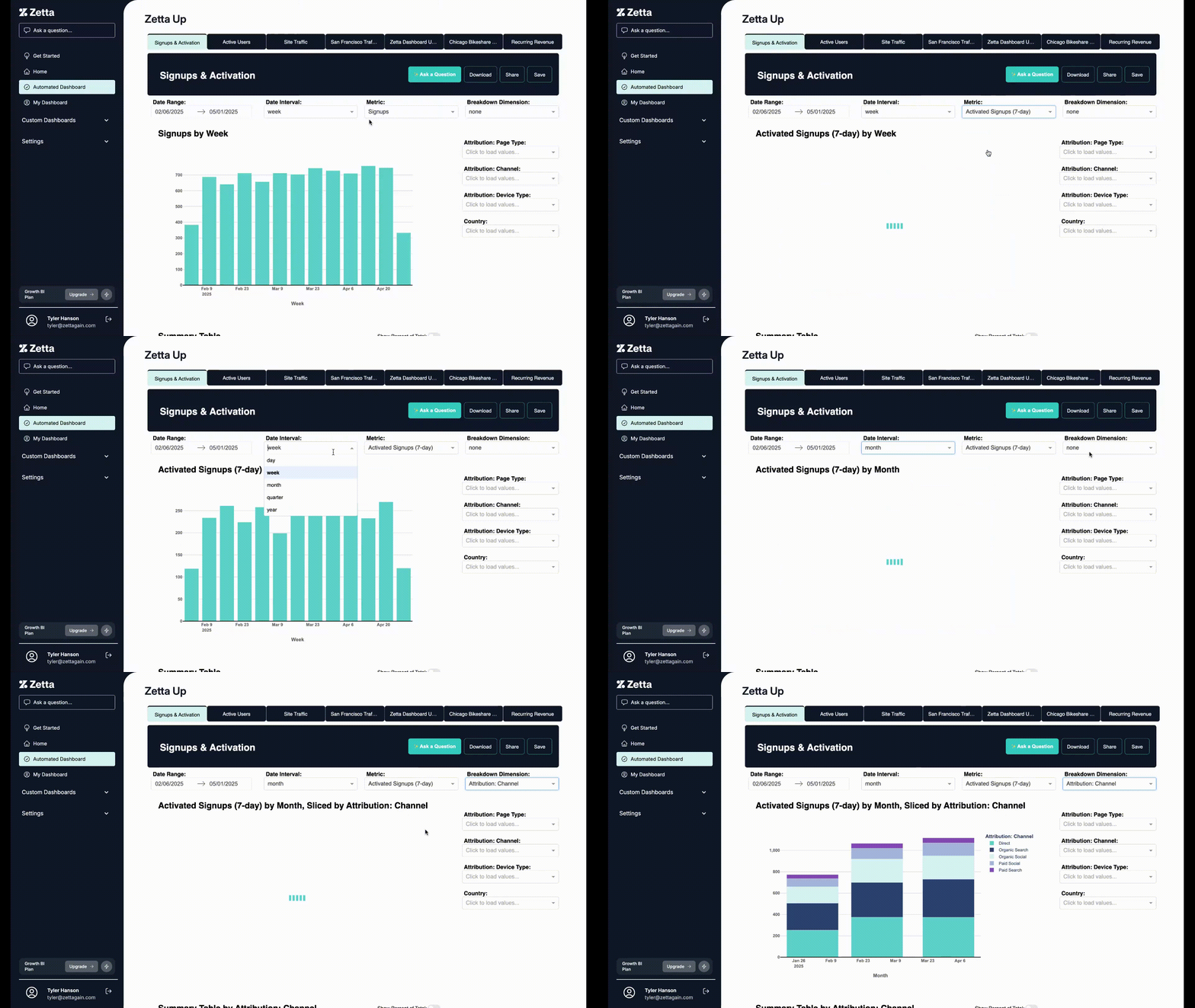
All of the parameters and processes that I described above are fully native to
Zetta. After you set up metrics and dimensions, we’ll immediately generate
an automated dashboard with this layout. You’ll never need to manage the
same metric in multiple charts, and you can even access metric and dimension
descriptions descriptions directly on dashboards (no more “what does this mean”
questions).
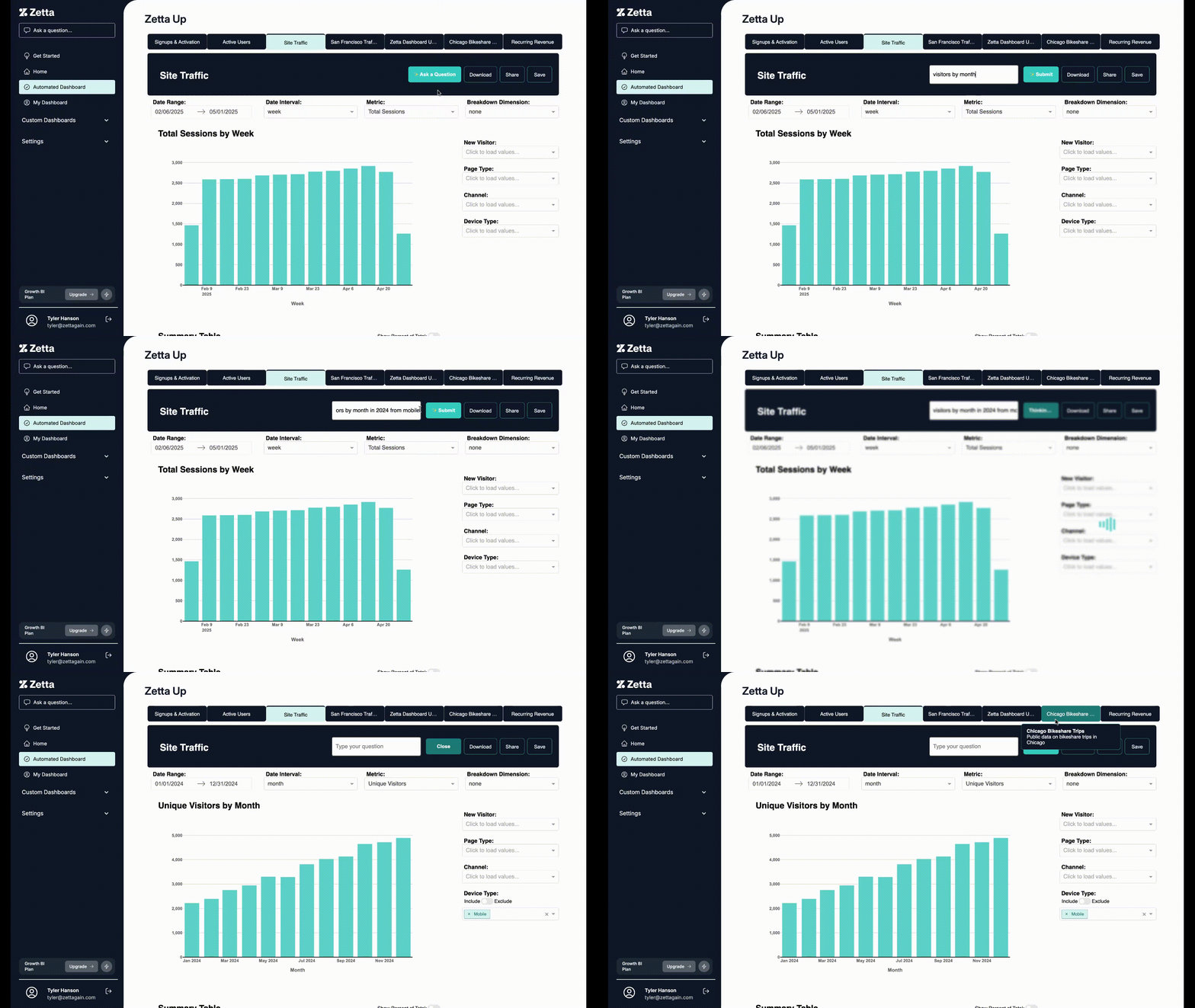
My favorite Zetta feature might be the “Ask a Question” box at the top of our
automated dashboard. I can’t tell you how many times I’ve invested effort
into creating the perfect flexible dashboard, only to be told by an end user
that “it’s too hard to navigate all of the dropdowns”. Well, that excuse is
no longer valid: with Zetta, you can type in a natural language question and
the filters and dropdowns on the dashboard will automatically update to yield
an answer:
All of your favorite sharing features are here too: generate a link to a
specific filter set to share with your team, bookmark you favorite dashboard
configurations, and save individual charts to a personal dashboard.
If all else fails, we do still have a custom dashboard builder
(with a UI built by yours truly, front-end whiz). But, my hope
is that only a minority of Zetta customers will need to touch it.
After all, why would you put yourself through that?
Zetta now has a free plan, so please give it a shot and let me know what you think.
My hope is that BI can finally become a little less convoluted and the debate over
self-service can become irrelevant so we analysts can actually start doing something
For analysts, “Self-Service” means giving your end users better tools and flexibility - not letting them build things themselves
2025-05-06
Introduction
I get the impression that the idea of “self-service” analytics has something of a bad reputation in data circles. For many, the idea that business stakeholders could satisfy their own needs to pull datasets and answer analytical questions without involving a data analyst or a data engineer is a pipe dream, something that companies aspire to as they scale but never actually lands in reality. At the same time, though, most data teams don’t want to be treated as service organizations that are obligated to fulfill a never-ending stream of requests of varying complexity.
So, what’s the answer? The reality is there’s a lot of daylight between a self-service free-for-all and a totalitarian data state. I’m a big proponent of self-service analytics when it means a very specific thing: end users are given very flexible dashboards and tools that can answer a wide range of questions, but they aren’t allowed to edit or build any content in the data ecosystem. This might not meet the most common definition of “self-service”, but I’ve found in practice that it’s a great balance between making answers readily available and ensuring quality.
Self-Service: The Traditional Approach
“Self-service” can mean a lot of different things: traditionally, it might refer to the idea of opening up some or all of a company’s data stack to non-data end-users in order to produce their own analysis, dashboards, or data models. The purpose is two-fold: for business users, they have some agency in how reports are generated and don’t have to wait indefinitely for an overworked data team to do things for them, especially if the data team doesn’t have the necessary business context to take on the work effectively. For data teams, this relieves of the pressure on their workload by having at least a subset of more tech-savvy end users satisfying their own requests.
Of course, this approach has the potential to devolve into pure chaos:
- How is quality and consistency ensured when any end user can stand up their own reports and metrics? This can be mitigated by only opening up a portion of the data stack (for example, letting end users build dashboards but not create data models, or letting them create dashboards within a limited context like a Looker explore), but any analyst will tell you that there’s a lot of hidden complexity that comes with even the simplest of reports.
- Giving individual business units responsibility for their own analytics encourages biased perspectives: these teams will have a tendency, conscious or otherwise, to interpret and present data in a way that supports their own internal success or ambitions. If every team operates in this way, cross-functional collaboration becomes difficult or impossible since each team is telling a different narrative in a different language
- Data teams end up being a help desk anyway, troubleshooting the ill-advised data ventures of business teams. In a centralized context, the data team would at least maintain some control over the context in which content is built. With self-service, they instead have to fix bugs in code they’ve never written to solve problems they don’t care about with methods they would never choose.
But, most “self-service” implementations fail before they even start because business users can’t be bothered to put in the necessary work to begin with! It’s hard to blame them; no matter how slow or inept their data team is, taking on that work themselves is unlikely to be worth the effort. So, opening up permissions and promoting a “self-service” approach just turns into a huge waste of time as data teams end up reverting back to service organizations anyway (just with extra steps).
Self-Service Properly Understood
Over the years I’ve come to see the idea of self-service differently, with one key distinction from the traditional approach: end users should not have any ability to edit or create new data assets.
So, how can this still be “self-service”? Well, from one point of view it isn’t: end users are restricted from actually making any changes to content themselves, so if they need a new report that’s not available on an existing dashboard they’ll have to ask an analyst (they can’t “self-serve”).
But, this restriction begs another question: can we make a dashboard that’s flexible enough that an end user would never need to add or change content, even if they were able to? If this were the case, then the distinction here would become irrelevant.
I don’t think it’s possible to make a dashboard like this that’s perfectly future proof, but I do know from experience that it’s possible to split the difference and build something that satisfies 90% of inbound requests while only requiring occasional work to extend functionality to the remaining 10%. This yields the best of both worlds: end users are unblocked with powerful tools, while analysts still have oversight (both via the guardrails in place on the original product and the need to interact with stakeholders to field requests for extensions).
So, what does a really great flexible self-service dashboard look like?
- Configurable date options for time series: any time I’m showing a time series chart, I’ll always include a date range parameter as well as a date interval parameter that allows the user to toggle between different frequencies (daily, weekly, monthly, etc.). There’s absolutely no reason to maintain multiple time series charts for different frequencies!
- Dropdown metric selector: The same charts can be re-used for any number of metrics by allowing the user to swap out the metric shown with a dropdown
- Dropdown dimension selector: For any time series or summary table, I include a breakdown dimension (or “slice”) parameter that lets the end user choose which variable is used to bucket rows in a table or stacked bars in a bar chart
- Filters for all dimensions: any dimension that can be used to break down a metric should also be available as a filter to include/exclude values
Just with these parameters, you can start answering questions with a basic feedback loop of filtering and decomposing. Notice that signups were down last week? Start toggling through breakdown dimensions to find which cut best explains the difference. Notice that organic social signups dropped while other segments stayed flat? Filter down to this segment and start looking through different campaigns and channels.
Instead of creating multiple single-use dashboards for different teams, you can direct them to the same general-purpose dashboard filtered to the subset of data they care about. Will they do this on their own? Probably not. They’ll probably still ask you to create a new dashboard every other week. But, how long does it take to toggle a few filters and send a link?
Zetta’s Approach
While I’ve implemented this kind of hybrid self-service approach in a few different BI tools, it ends up being a cumbersome process; I have to slog through terrible UIs to set up the same metric and dimension dropdowns over and over again and drag-and-drop until I get the same dashboard layout I always use.
The only solution? Create my own BI tool. Enter Zetta: my ultimate solution for self-service analytics.
All of the parameters and processes that I described above are fully native to Zetta. After you set up metrics and dimensions, we’ll immediately generate an automated dashboard with this layout. You’ll never need to manage the same metric in multiple charts, and you can even access metric and dimension descriptions descriptions directly on dashboards (no more “what does this mean” questions).
My favorite Zetta feature might be the “Ask a Question” box at the top of our automated dashboard. I can’t tell you how many times I’ve invested effort into creating the perfect flexible dashboard, only to be told by an end user that “it’s too hard to navigate all of the dropdowns”. Well, that excuse is no longer valid: with Zetta, you can type in a natural language question and the filters and dropdowns on the dashboard will automatically update to yield an answer:
All of your favorite sharing features are here too: generate a link to a specific filter set to share with your team, bookmark you favorite dashboard configurations, and save individual charts to a personal dashboard.
If all else fails, we do still have a custom dashboard builder (with a UI built by yours truly, front-end whiz). But, my hope is that only a minority of Zetta customers will need to touch it. After all, why would you put yourself through that?
Zetta now has a free plan, so please give it a shot and let me know what you think. My hope is that BI can finally become a little less convoluted and the debate over self-service can become irrelevant so we analysts can actually start doing something